


Popular articles



Borderlands 4 PC: NVIDIA’s optimal settings mapped for 1080p–4K
Table of Content

As Borderlands 4 lands on PC, 2K has shared early guidance on graphics tuning and expected performance. The studio set clear targets for baseline and recommended hardware, while NVIDIA provided detailed “Optimal Settings” charts spanning 1080p, 1440p and 4K across multiple GeForce generations. The guidance leans on DLSS and, where available, DLSS Frame Generation to stabilize frame rates. Shaders will recompile after any graphics change – the team advises playing for at least 15 minutes before judging performance shifts. NVIDIA also references its current Game Ready Driver version 581.29.
Baseline PC targets
- Minimum PC specs – 1080p at 30 FPS using the Low preset.
- Recommended PC specs – 1440p at 60 FPS using the Medium preset.
These targets frame the in-game presets that players should expect to use for smooth performance on entry-level and mid-range configurations.
What NVIDIA’s charts recommend
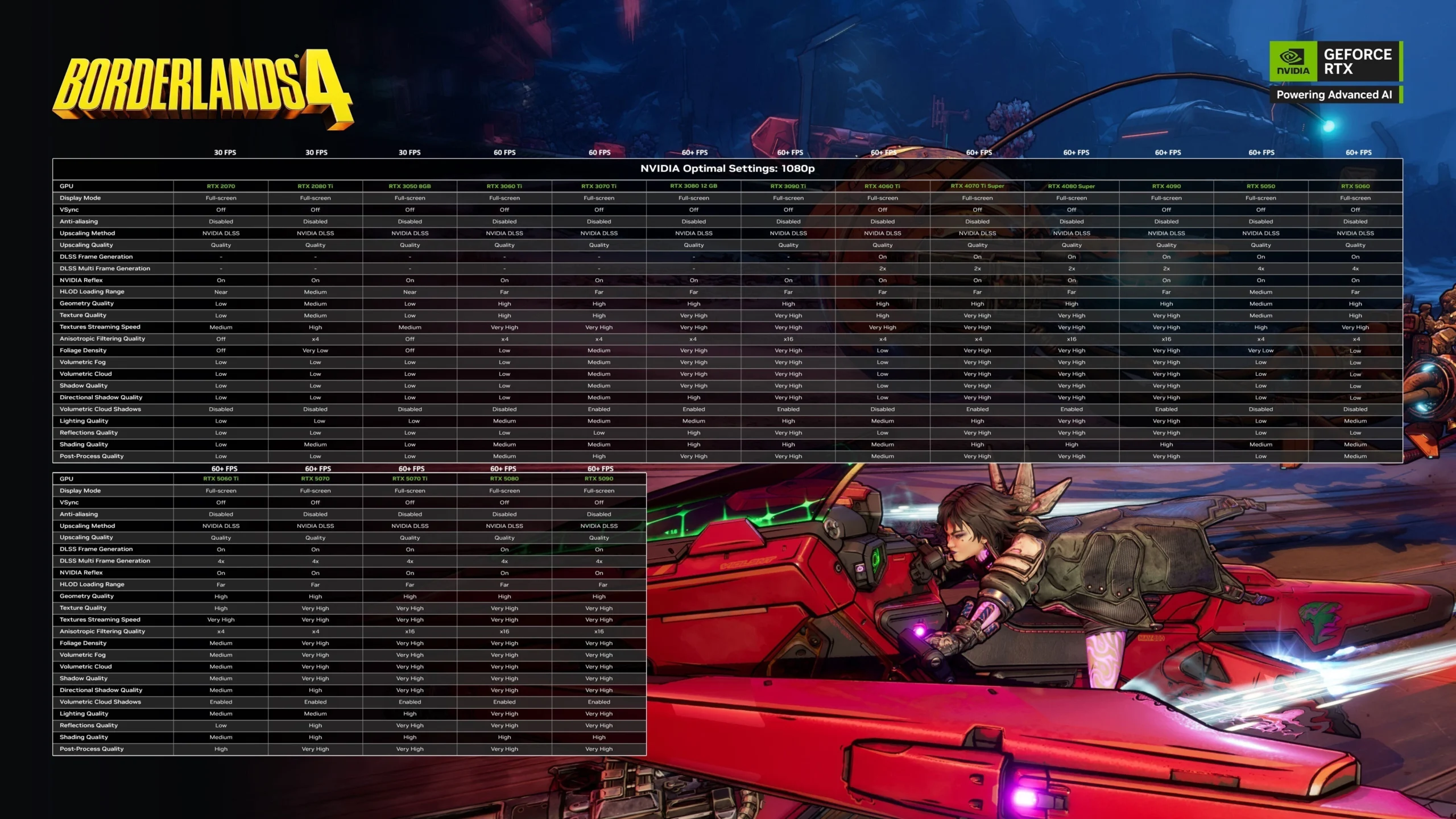
NVIDIA’s per-GPU recommendations emphasize DLSS and Reflex across the board, with Frame Generation available on GeForce RTX 40‑ and 50‑series. DLSS preset choices generally scale with resolution – Quality at 1080p, Balanced at 1440p, and Performance at 4K – with select exceptions noted below. Reflex is consistently set to On.
1080p overview – 30 to 60+ FPS
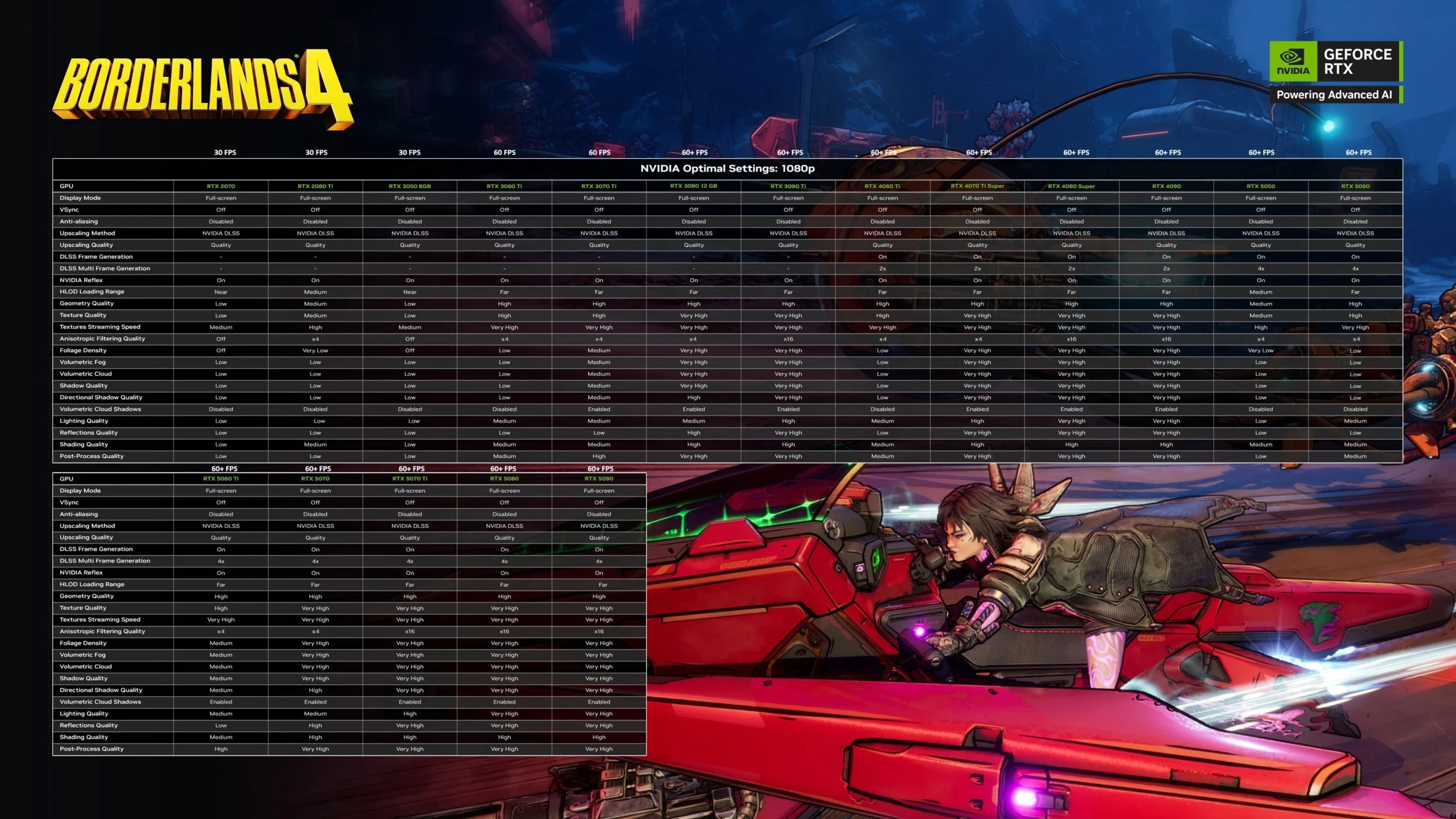
- 30 FPS tier – RTX 2070, RTX 2080 Ti, RTX 3050 8 GB using DLSS Quality, Low to Medium visuals; Frame Generation not available.
- 60 FPS tier – RTX 3060 Ti, RTX 3070 Ti on DLSS Quality, Medium to High visuals; FG not available.
- 60+ FPS tier (30‑series high‑end) – RTX 3080 12 GB, RTX 3090 Ti on DLSS Quality, High to Very High textures/effects; FG not available.
- 60+ FPS tier (40‑series) – RTX 4060 Ti, RTX 4070 Ti Super, RTX 4080 Super, RTX 4090 on DLSS Quality with Frame Generation On (Multi‑Frame Generation 2x), settings from Medium up to Very High depending on GPU.
- 60+ FPS tier (50‑series) – RTX 5050, RTX 5060, RTX 5060 Ti, RTX 5070, RTX 5070 Ti, RTX 5080, RTX 5090 on DLSS Quality with Frame Generation On (Multi‑Frame Generation 4x), visuals ranging from Medium to Very High by model.
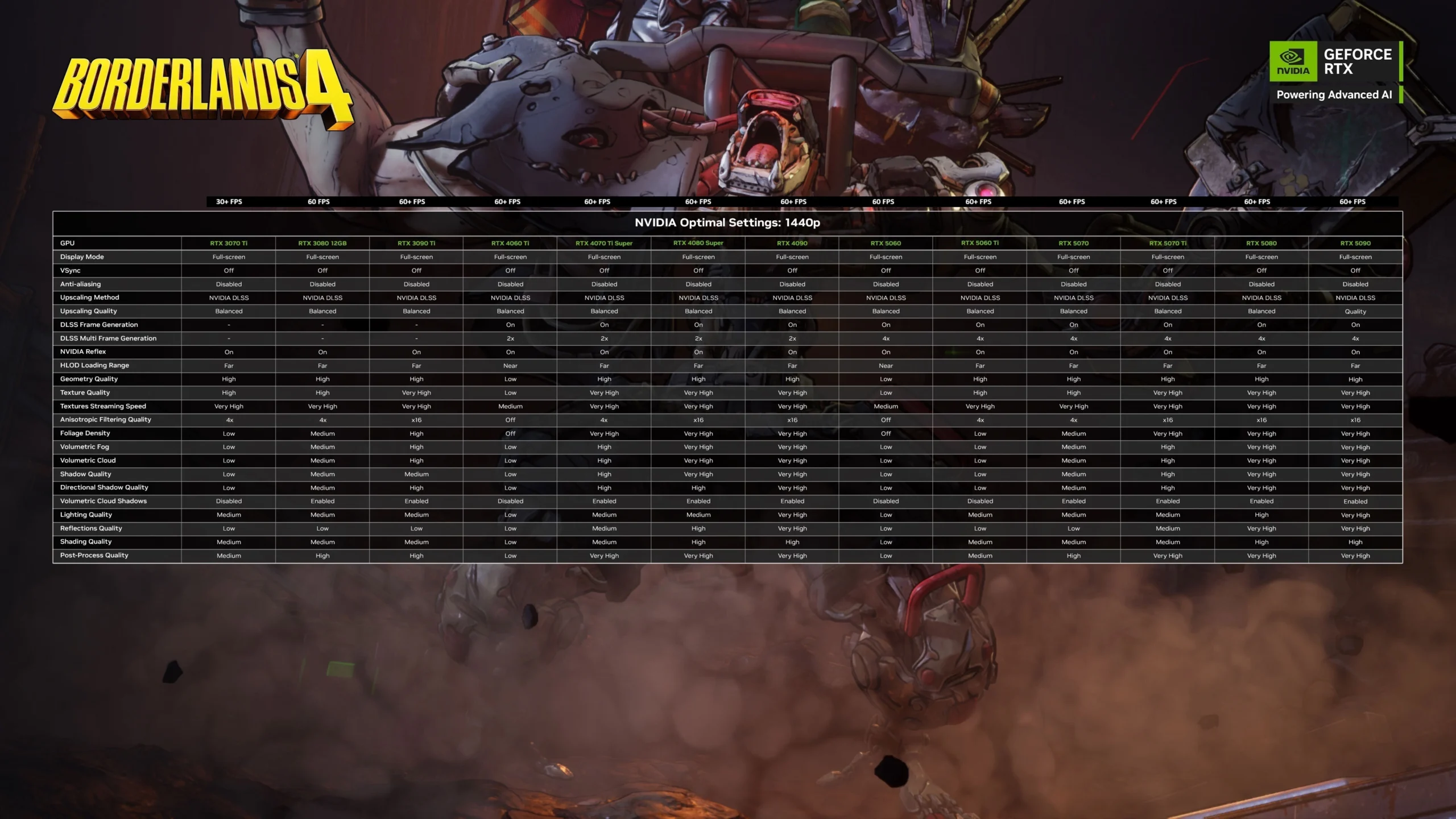
1440p overview – from 30+ to 60+ FPS
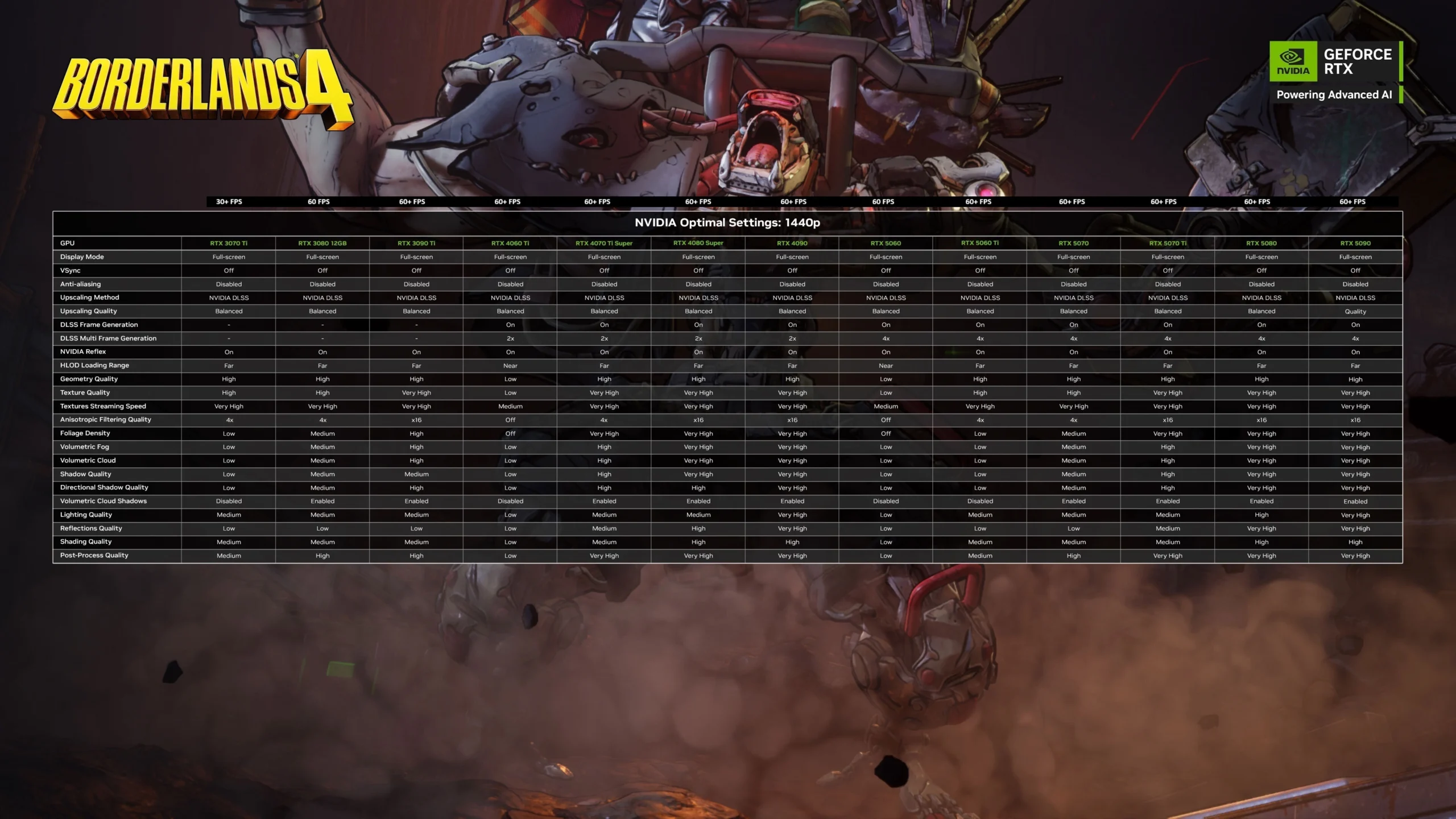
- 30+ FPS entry – RTX 3070 Ti on DLSS Balanced, a Low/Medium mix.
- 60 FPS target – RTX 3080 12 GB on DLSS Balanced, Medium/High settings.
- 60+ FPS (30‑series flagship) – RTX 3090 Ti on DLSS Balanced, Very High textures and higher volumetrics; AF up to x16.
- 60+ FPS (40‑series) – RTX 4060 Ti, RTX 4070 Ti Super, RTX 4080 Super, RTX 4090 on DLSS Balanced with Frame Generation On (2x), scaling from Low to Very High by GPU.
- 60‑60+ FPS (50‑series) – RTX 5060, RTX 5060 Ti, RTX 5070, RTX 5070 Ti, RTX 5080, RTX 5090 with Frame Generation On (4x); most use DLSS Balanced, while RTX 5090 employs DLSS Quality at this resolution.
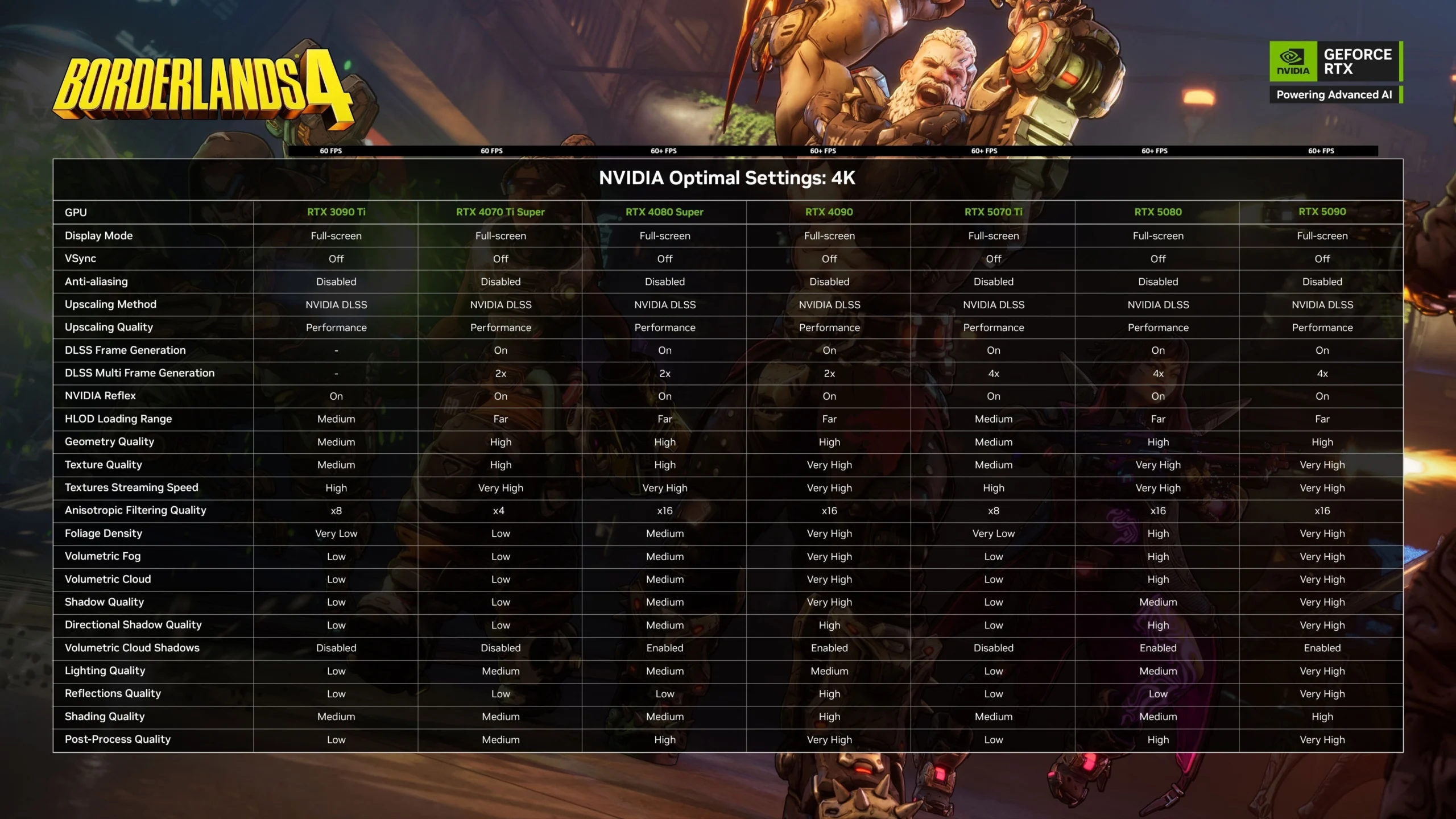
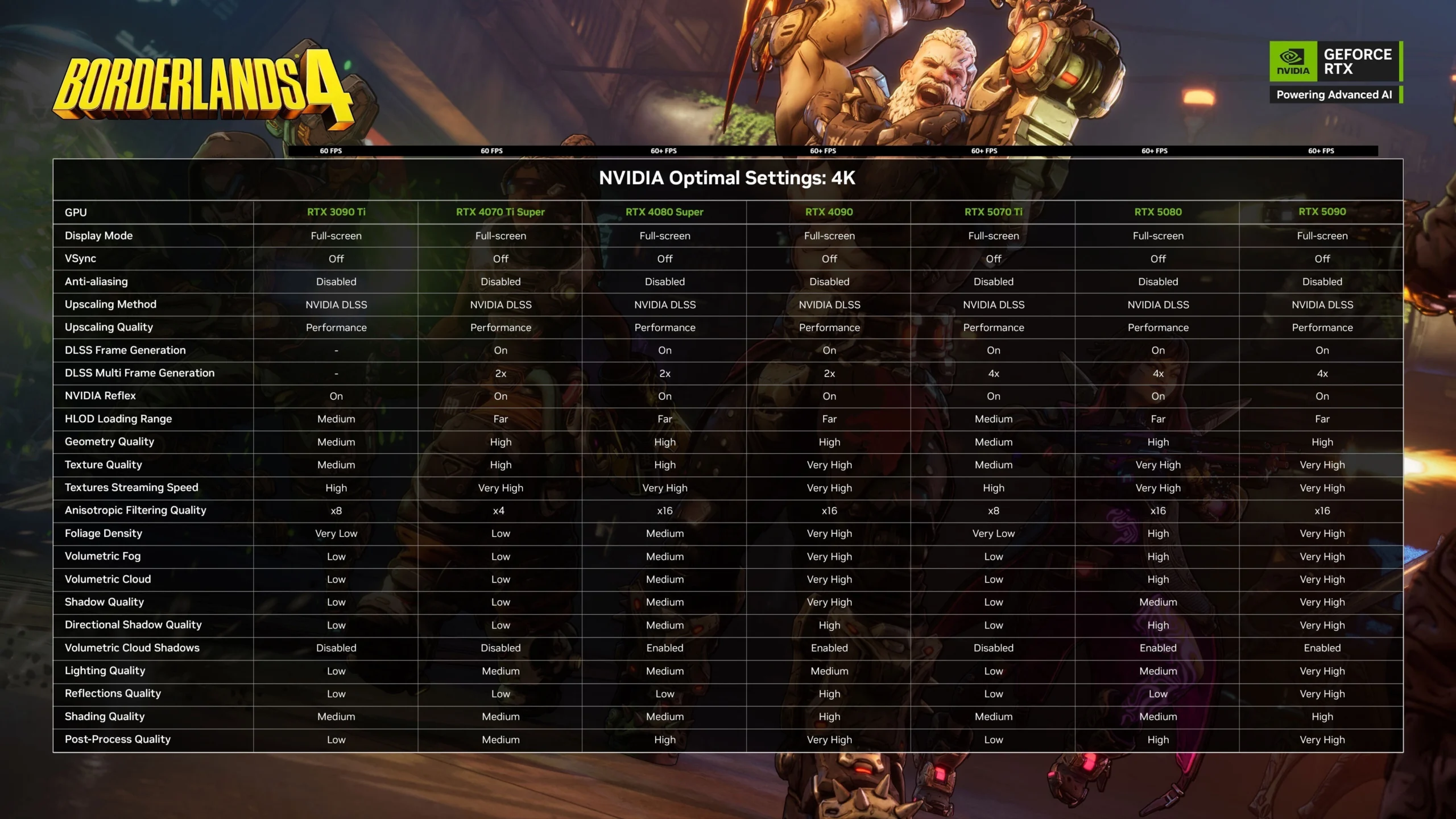
4K overview – 60 to 60+ FPS
- 60 FPS (30‑series flagship) – RTX 3090 Ti on DLSS Performance, a Medium/Low mix; FG not available.
- 60 FPS (upper 40‑series) – RTX 4070 Ti Super with DLSS Performance and Frame Generation On (2x), Low/Medium visuals.
- 60+ FPS (top 40‑series) – RTX 4080 Super, RTX 4090 on DLSS Performance with Frame Generation On (2x), Medium to Very High settings depending on card.
- 60+ FPS (50‑series) – RTX 5070 Ti, RTX 5080, RTX 5090 on DLSS Performance with Frame Generation On (4x); visual quality ranges from Medium to Very High by model tier.
Read also our article: Borderlands 4 PC performance targets explained: 1080p to 4K
Practical notes for tweaking
- Shader recompilation – after changing graphics settings, shaders will rebuild; play at least 15 minutes to see the new performance baseline.
- Driver context – NVIDIA’s charts reference Game Ready Driver 581.29.
- Reflex – enabled in all listed configurations to reduce system latency.
At‑a‑glance performance matrix
The table below condenses the targets by resolution, typical DLSS mode, and representative GPUs that meet the stated frame rates based on NVIDIA’s charts. Use it as a quick anchor before fine‑tuning individual options.
Table – Summary of target settings by resolution
Bottom line for PC players
Borderlands 4’s PC targets are straightforward: aim for the Low preset at 1080p‑30 or Medium at 1440p‑60, then layer in NVIDIA’s DLSS and Frame Generation guidance to climb higher. The official charts show that 20‑ and 30‑series cards rely on DLSS without Frame Generation, while 40‑ and 50‑series parts use FG to secure 60‑plus FPS across resolutions. Make a change, let shaders recompile, and only then judge whether to nudge visuals up or down.
Category
Share the news


Meet the Author


Article:
Read all

Solid Snake joins Rainbow Six Siege on March 3 with intel‑driven tools and scavenging gameplay. A few weeks later, a limited‑time 4v4 infiltration mode arrives alongside map and balance updates.
 February 15, 2026
 3
3
Season 1 opens the first chapter with Domina, Emre, Mizuki, Anran, and Jetpack Cat, plus the Conquest meta race between Overwatch and Talon. The world will update in real time as the story unfolds.
February 14, 2026
3
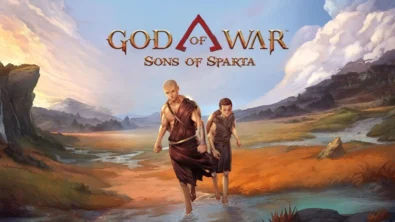
Kratos’ Spartan youth becomes playable in God of War Sons of Sparta – a canon, pixel‑art 2D prequel on PS5 with customizable spear‑and‑shield combat, Gifts of Olympus, and returning voice talent.
February 13, 2026
5
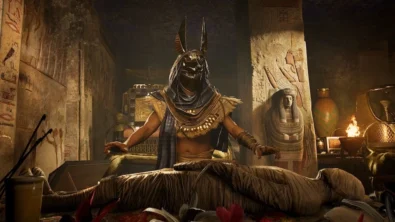
Ancient embalming, step by step – a new museum installation built on Assassin’s Creed Origins’ Discovery Tour lets visitors explore mummification interactively at Musée de l’Homme, open November 2025-May 2026.
February 13, 2026
6
Read also
Solid Snake joins Rainbow Six Siege on March 3 with intel‑driven tools and scavenging gameplay. A few weeks later, a limited‑time 4v4 infiltration mode arrives alongside map and balance updates.
February 15, 2026
3
Kratos’ Spartan youth becomes playable in God of War Sons of Sparta – a canon, pixel‑art 2D prequel on PS5 with customizable spear‑and‑shield combat, Gifts of Olympus, and returning voice talent.
February 13, 2026
5
Ancient embalming, step by step – a new museum installation built on Assassin’s Creed Origins’ Discovery Tour lets visitors explore mummification interactively at Musée de l’Homme, open November 2025-May 2026.
February 13, 2026
6
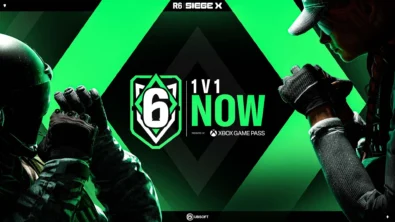
From training mode to centre stage: Rainbow Six Siege’s debut 1v1 circuit lands at the Six Invitational in Paris. Four regions, more than 3,200 entrants, semifinals Feb 14 and final Feb 15 for 5,000 US dollars.
February 13, 2026
5
Blizzard links its 2026 milestones with a cross‑franchise Showcase and confirms BlizzCon’s return later this year – with more announcements and “surprises” still queued, says president Johanna Faries.
February 13, 2026
5

High On Life 2 launches with day-one Game Pass Ultimate support, while Narrative Director Alec Robbins explains how the team crafts jokes with players—shaping character-driven, reactive comedy.
February 13, 2026
6
From a Star Trek survival-strategy take to stealth with Styx, eerie Backrooms horror, and management sims, Xbox’s February 17-20 slate packs 14 launches with Series X|S optimizations and cross-platform perks.
February 13, 2026
7
First full gameplay for CONTROL Resonant runs on PS5 Pro, spotlighting Dylan Faden in a reality-bending Manhattan with vast zones and Gravity Anomalies. Launch set for 2026 across console and PC ecosystems.
February 13, 2026
4
Borderlands 4 sets a co-op goal for this weekend: hit 500,000 successful teammate revives between February 12-15 to unlock a universal cosmetic skin. A minor update adds three Weekly Big Encore boss fights to raise the stakes.
February 13, 2026
6
A milestone collection bundles five classic Rayman versions, a first-ever playable SNES prototype, reimagined music, modern assist options, and over 50 minutes of developer interviews.
February 13, 2026
6

Співпраця
Співпраця - текст
TopGame Newsletter!
Unlock exclusive gaming deals, fresh guides, and insider picks — straight to your inbox. No spam, just real content for real players.
